We are often asked how to view the details of your monthly charges from EYOND.
Following are instructions to view and print your invoices:
Following are instructions to view and print your invoices:
To access the Billing screen from MRSware, select Go To on the menu bar. Select System Administration, the last menu option. This opens the System Administration screen as a separate dialog.
Once it is open, please select Billing from the left-side choices.
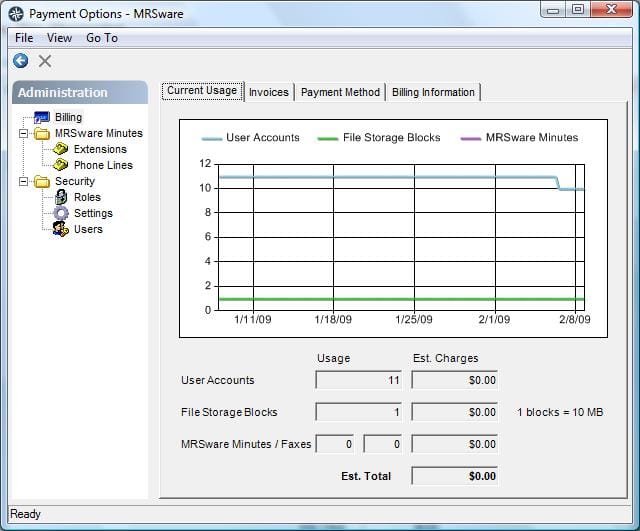
When the Billing screen opens you will see 4 tabs. The information you are looking for is found in the first 2 tabs.
Current usage shows the number of users on the system and the amount of file storage space being utilitzed. The user will also be able to see any additional services that are subscribed to and the totals being billed for all services.
Invoices displays the Invoice number, Invoice date, Non recurring charges, Total and Paid Invoices. The invoice details are available by opening the invoice to print. To view and print an invoice, double-click on the invoice or select Print from the button bar.
Once it is open, please select Billing from the left-side choices.
When the Billing screen opens you will see 4 tabs. The information you are looking for is found in the first 2 tabs.
Current usage shows the number of users on the system and the amount of file storage space being utilitzed. The user will also be able to see any additional services that are subscribed to and the totals being billed for all services.
Invoices displays the Invoice number, Invoice date, Non recurring charges, Total and Paid Invoices. The invoice details are available by opening the invoice to print. To view and print an invoice, double-click on the invoice or select Print from the button bar.