
When you sign up for the MRSware service you will fill out a Commitment letter. The information contained in the letter allows us to enter your billing information in the MRSware billing screens.
If your credit card or bank account change for any reason, the billing information will need to be updated.
You can enter your billing information directly into MRSware yourself.
Here's how:
If your credit card or bank account change for any reason, the billing information will need to be updated.
You can enter your billing information directly into MRSware yourself.
Here's how:
To access the Billing screen from MRSware, select Go To on the menu bar. Select System Administration, the last menu option. This opens the System Administration screen as a separate dialog. Once it is open, please select Billing from the left-side choices.
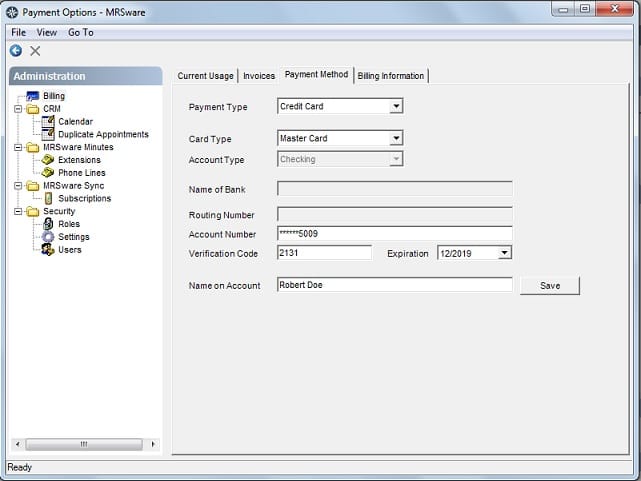
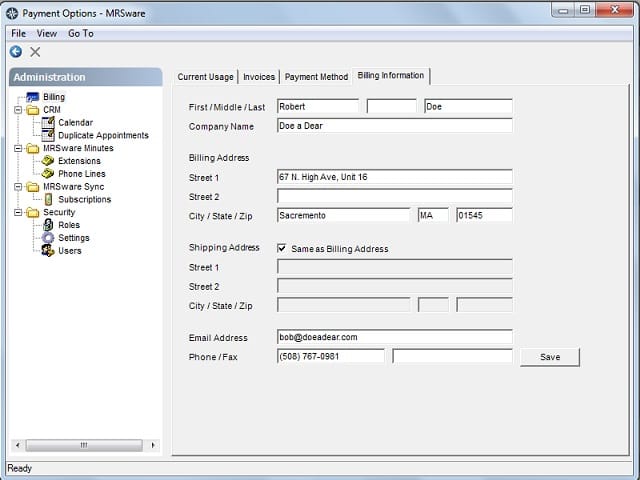
When the Billing screen opens you will see 4 tabs. The information you are looking for is found in the last 2 tabs.
When the Billing screen opens you will see 4 tabs. The information you are looking for is found in the last 2 tabs.
| Payment Method is where the user will input the desired payment form and its associated information. Complete the Payment Information tab by filling in all provided fields. | Billing Information is where the user will keep the contact information of the billing contact for MRSware services. Complete the Billing Information tab by filling in all provided fields. |
 |  |