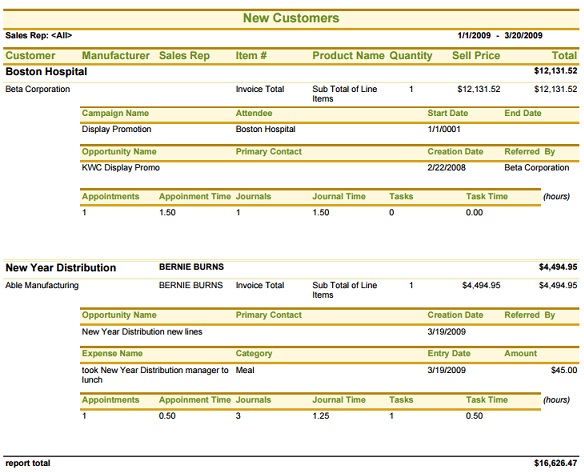
The New Customer report in Report Explorer answers the questions "Who are my new customers?" and "Where did they come from?" "Are they coming back" is not covered in this report.
Who are my new customers
The report lists any new customers within the selected time range. A new customer is defined by us as a customer that has made a new order within the selected time range, where they have not purchased in the previous 1 year period to that time range.
For example, entering From 1/1/2009 To 3/19/2009 will give you all of the customers that have made a purchase between 1/1/2009 and 3/19/2009 who did not make any orders between 1/1/2008 and 12/31/2008.
This is a 1-year rolling timeframe for being designated as a "new" customer. If you only purchase once a year, you are still not a new customer. If you purchase only once every 2 years, than you would show up on the report as a new customer.
The optional Product details section will also show what they have purchased since becoming a customer.
Who are my new customers
The report lists any new customers within the selected time range. A new customer is defined by us as a customer that has made a new order within the selected time range, where they have not purchased in the previous 1 year period to that time range.
For example, entering From 1/1/2009 To 3/19/2009 will give you all of the customers that have made a purchase between 1/1/2009 and 3/19/2009 who did not make any orders between 1/1/2008 and 12/31/2008.
This is a 1-year rolling timeframe for being designated as a "new" customer. If you only purchase once a year, you are still not a new customer. If you purchase only once every 2 years, than you would show up on the report as a new customer.
The optional Product details section will also show what they have purchased since becoming a customer.
Where did the new customers come from
The Touch Points portion if the report highlights the different types of interaction which have lead up to this Company becoming a Customer, as well as the Activity since. All associated activity is shown regardless of time range entered. The types of touch points shown include entries from:
The Activites section is a roll-up of the number of Appointments, Journals, and Tasks as well as a sum of the amount of time for each of those types of entries (in hours). All the Activities for both the Company itself as well as individual Contacts at the Company are included in the Touch Points section, to enable a comprehensive view of what went into capturing this New Customer.
Take a look at the attached sample report from our Demo system. Try the report in your system and see what interesting facts show up.
The Touch Points portion if the report highlights the different types of interaction which have lead up to this Company becoming a Customer, as well as the Activity since. All associated activity is shown regardless of time range entered. The types of touch points shown include entries from:
- Campains
- Opportunity Tracking
- Expense Reports
- Actvities
The Activites section is a roll-up of the number of Appointments, Journals, and Tasks as well as a sum of the amount of time for each of those types of entries (in hours). All the Activities for both the Company itself as well as individual Contacts at the Company are included in the Touch Points section, to enable a comprehensive view of what went into capturing this New Customer.
Take a look at the attached sample report from our Demo system. Try the report in your system and see what interesting facts show up.