
There may come a time when you want to remove a lot of Categories all at once from the system. This can be the result of some re-organization of the categories, or perhaps removal of some imported categories that aren't needed after all. The system won't let the user delete a category that is currently in use, so the basic outline of this operation is to un-assign all the categories to be deleted, then delete them.
This is actually quite easily done using the "Bulk" → "Update Categories" function to un-assign all the categories, then using the "Go To" → "Contact Relationship Management" → "Manage Contact" → "Categories" menu option to delete the categories.
All Companies with these Categories
First, we would like a list of all the Companies that have our unwanted categories assigned to them. Use the "Search" → "Companies" menu, selecting all of the categories that we want to remove in the categories list, and press Ok. The resulting list is all of the Companies with those categories assigned.
Bulk Update Categories
Press Ctrl-A to select all of the Companies in the list. Right-click on one of the selected companies and choose "Bulk" → "Update Categories".
All Companies with these Categories
First, we would like a list of all the Companies that have our unwanted categories assigned to them. Use the "Search" → "Companies" menu, selecting all of the categories that we want to remove in the categories list, and press Ok. The resulting list is all of the Companies with those categories assigned.
Bulk Update Categories
Press Ctrl-A to select all of the Companies in the list. Right-click on one of the selected companies and choose "Bulk" → "Update Categories".
| What you will see is a list of the Categories in your system, and check marks indicating whether the category is assigned to any of the selected contacts or not: black check mark = all of the selected companies are assigned this category gray check mark = some of the selected companies are assigned this category no check mark = none of the selected companies are assigned this category | 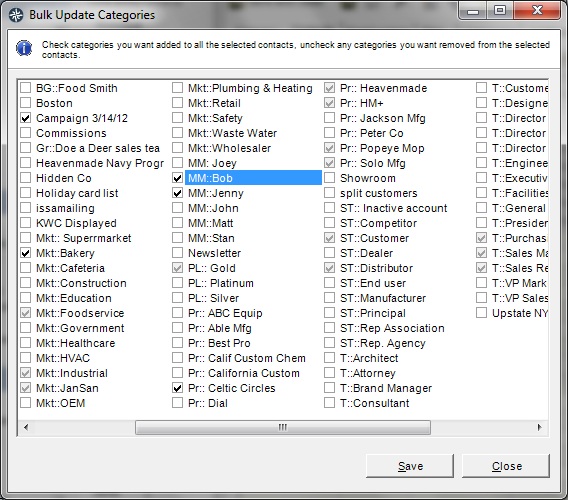 |
Uncheck all of the categories that you want to delete, so that the categories are not assigned to any companies.
Repeat the search, this time for contacts, to remove all of the unwanted categories from any contacts that might have them assigned as well.
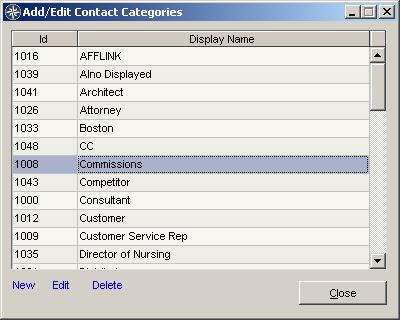 | Delete Categories Now that all the categories are no longer in use, they can be deleted as normal through the "Go To" → "Contact Relationship Management" → "Manage Contact" → "Categories" menu. Select the unwanted category and press the delete key. Continue until all of the categories are removed. |