
The new Sales and Commissions report is very similar to the Sales Summary report, which Users should review to learn more about the options and use of this report.
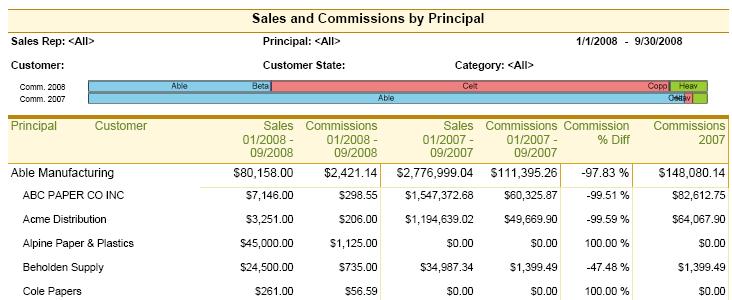
The concept of this report is to provide sales information with related commissions. The report itself drops the Sales Summary's month columns in favor of the Commissions columns. The type of commission shown is User-selectable to show any one of:
The concept of this report is to provide sales information with related commissions. The report itself drops the Sales Summary's month columns in favor of the Commissions columns. The type of commission shown is User-selectable to show any one of:
- Total Commissions: Amount of commission paid to the Agency.
- Agency Split: Portion of the total commissions kept in the Agency.
- Sales Rep Split: Portion of the total commission paid to the Sales Rep.
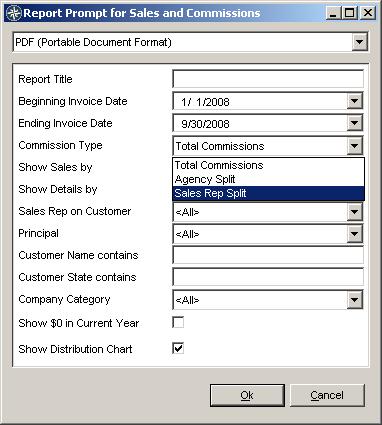
For a complete list and explanation of the Parameters available on this report, refer to the Sales- and Commissions-based Reports' Parameters page.
Permissions
As with all reports that show Commissions, the system permissions are followed so that an given User can only see the type(s) of commissions that they are permitted to. The permissions are control in the System Administration screen using:
In order to see the Total Commissions, the User must have "View Agency Split" permissions and "Commissions Figurers" permissions.
Permissions
As with all reports that show Commissions, the system permissions are followed so that an given User can only see the type(s) of commissions that they are permitted to. The permissions are control in the System Administration screen using:
- Commissions Figures under Reporting and Analysis
- View Agency Split under Manufacturers Rep, Commissions
- View Sales Rep Split under Manufacturers Rep, Commissions
In order to see the Total Commissions, the User must have "View Agency Split" permissions and "Commissions Figurers" permissions.