
The Users section of System Administration is where all of the existing MRSware Users are shown, and where new Users are added. Users also contains the Roles, which are the permissions assigned to each person.
Use the "Go To" menu in MRSware to open "System Administration". You will see both the "Users" and "Roles" sections at the bottom of the System Administration dialog. Click on Users, select a User, press the Edit button. On the Roles tab you will see all of their assigned Roles.
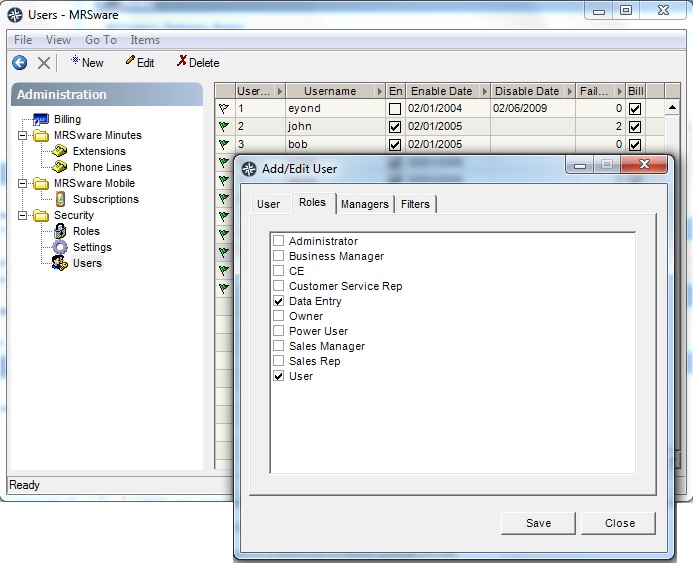
Now close the User dialog and go to Roles. Open the corresponding Role to see the permissions. Red flags mean the permission for this item is not enabled (off); green flags mean the permission is enabled (on).
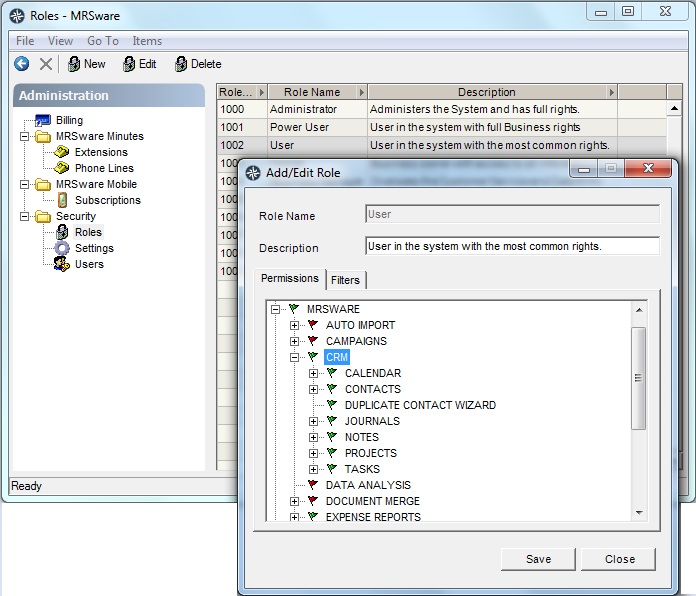
Roles are cumulative, meaning that if a User has both the "User" and "Sales Rep" Roles, they will have the combined permissions for each Role... Be sure to check each Role assigned to a User to get a correct understanding of what permissions that User has.
In general, all regular Users will has the "User" Role as this is the base permission to access most basic functions of the system, like contacts, calendars, etc.