
Every time MRSware starts, it checks several government run atomic clocks via the Internet for the current time and updates the computer appropriately. Users can also run the time update feature directly by going to Tools → Preferences and clicking on Time Synchonizer.
It is pretty important to keep all users' computers on the correct time -- whenever a user updates something in the system, it is stamped with the current time. This time stamp is used to make sure one user isn't overwriting another, and in synchronization to make sure that the latest update is kept. If someone's computer was off by a significant amount, you might get some inconsistent results.
It is pretty important to keep all users' computers on the correct time -- whenever a user updates something in the system, it is stamped with the current time. This time stamp is used to make sure one user isn't overwriting another, and in synchronization to make sure that the latest update is kept. If someone's computer was off by a significant amount, you might get some inconsistent results.
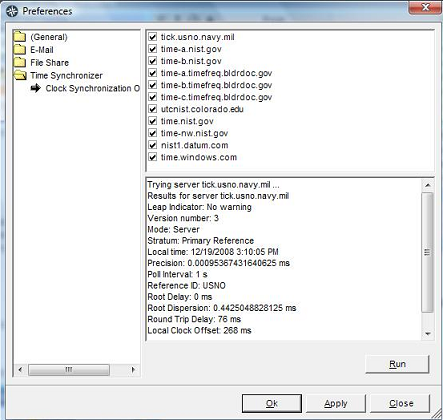
Another important aspect of time is the Time Zone setting on your computer. Having the wrong time zone can lead to things getting really confusing...
Think about that appointment someone made in the company for 1PM, but their computer was set to mountain time instead of their correct central time. That appointment would appear like it was 2PM to everyone else in the office. That is an easy way to get zero attendance at your meetings. The Time Synchronizer cannot set your computer's Time Zone, so make sure you have it set correctly.
Think about that appointment someone made in the company for 1PM, but their computer was set to mountain time instead of their correct central time. That appointment would appear like it was 2PM to everyone else in the office. That is an easy way to get zero attendance at your meetings. The Time Synchronizer cannot set your computer's Time Zone, so make sure you have it set correctly.