
Google Multi-Calendar Sync with MRSware
Compatibility: MRSware Desktop & MRSweb Cloud Service
Synchronization is the process of updating MRSware and Google Calendar so that your Appointments appear in both places, and any changes made in either place will be reflected in the other.
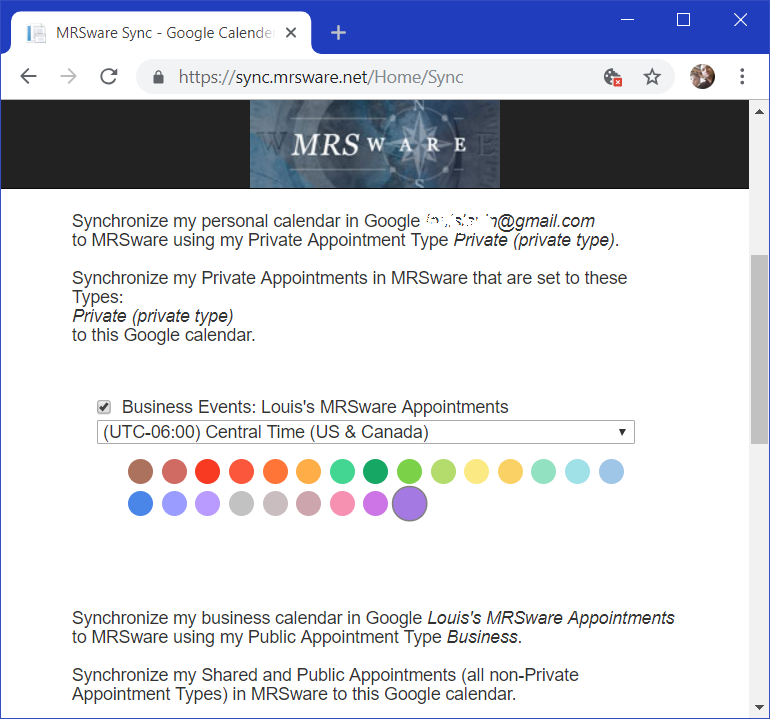
The multi-calendar synchronization allows the User to keep in-sync both their personal calendar in Google as well as their Shared calendar in MRSware, while keeping them separate and private/shared appropriately... While you would like to block out the time for your dentist appointment in your work calendar, you don't necessarily need any of the visit details shared with the office, for example.
Each person has the option to sync or not sync each of the calendars in their Google account. To do so, use your Sync Subscription settings (contact your office admin if you are not sure what that is) to login to https://sync.mrsware.net/ and set up your account.
The multi-calendar synchronization allows the User to keep in-sync both their personal calendar in Google as well as their Shared calendar in MRSware, while keeping them separate and private/shared appropriately... While you would like to block out the time for your dentist appointment in your work calendar, you don't necessarily need any of the visit details shared with the office, for example.
Each person has the option to sync or not sync each of the calendars in their Google account. To do so, use your Sync Subscription settings (contact your office admin if you are not sure what that is) to login to https://sync.mrsware.net/ and set up your account.
Awesome Bonus Features
Many web services and other programs that you use on a daily basis integrate with your Google calendar, through MRSware Sync, those appointments can readily appear in MRSware as well with no additional effort.
Automatically Log Incoming and Outgoing Business Calls
Using a free tool IFTTT (if-this-then-that), set up calls to your phone to be entered as appointments on your calendar. Those entries will also be sync'ed to MRSware, so that you can easily add call Notes, link them to who called, and generate Activity Reports.
Using a free tool IFTTT (if-this-then-that), set up calls to your phone to be entered as appointments on your calendar. Those entries will also be sync'ed to MRSware, so that you can easily add call Notes, link them to who called, and generate Activity Reports.
Use Alexa / Google Voice to add Appointments
Using your favorite voice controlled devices at home, say the command phrase and tell it to add an appointment to your calendar. If your device is set up to use your Google Calendar, those appointments will now show in MRSware as well, with Reminders and the ability to share it with the office.
Using your favorite voice controlled devices at home, say the command phrase and tell it to add an appointment to your calendar. If your device is set up to use your Google Calendar, those appointments will now show in MRSware as well, with Reminders and the ability to share it with the office.