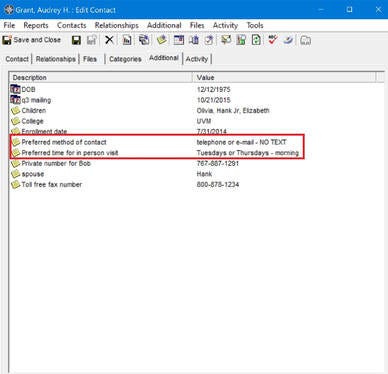
In addition to tracking the new rules, regulations, and guidelines being put in place during the Phased re-openings of business, you will want to track any individual preferences that will make it easier for you, and your customer, to do business together.
Although there are different kinds of preferences in MRSware - email preferences, table column view preferences, data view style preferences, and more - the preferences referred to in "Part 2 of the CRM in the Pandemic Era" series "Tracking Customer Preferences" is all about capturing and tracking your customers' preferences for communicating and doing business with you.
One way to enter the information is in the Contact's Additional tab.
Here's how:
In MRSware -
1. Open a Contact card
2. On the menu bar, click on "Additional -> New"
3. Enter a title in the "Description" field, e.g. "preferred method of contact" or "communication preference"
4. Enter information in the "Value" field, e.g. "no in-person meetings, e-mail, or Zoom only"
5. Click "Ok"
You can set up as many Additional fields as you like. Additional fields are searchable.
In MRSweb -
The Additional tab feature is in development
On your phone -
1. Tap on Contacts
2. Select a Contact
3. Tap "Edit"
4. Tap "Notes"
5. Enter the new communication preference in the contact's company
6. Tap "Save"
On your phone, once saved, the information will be Sync'd with MRSware Sync, so you have access to the information wherever you're working.