MRSweb - Lesson 15.4 - Product Catalog - Sidebar | MRSweb Online Training
← Back to Web Training Curriculum Hub
Lesson 67 of 69
Lesson 15
Chapter 4 - Product Catalog Sidebar
In Lesson 2.4 Settings, we learned about customizing your MRSweb with the use of Settings. In Lesson 2.7 Sidebar, we learned more about the Sidebar in MRSweb. The Sidebar setting is not available on the Home page, but is available in all other areas of MRSweb.
! In Settings, check "Landscape" to make sure the Sidebar appears in your pages.
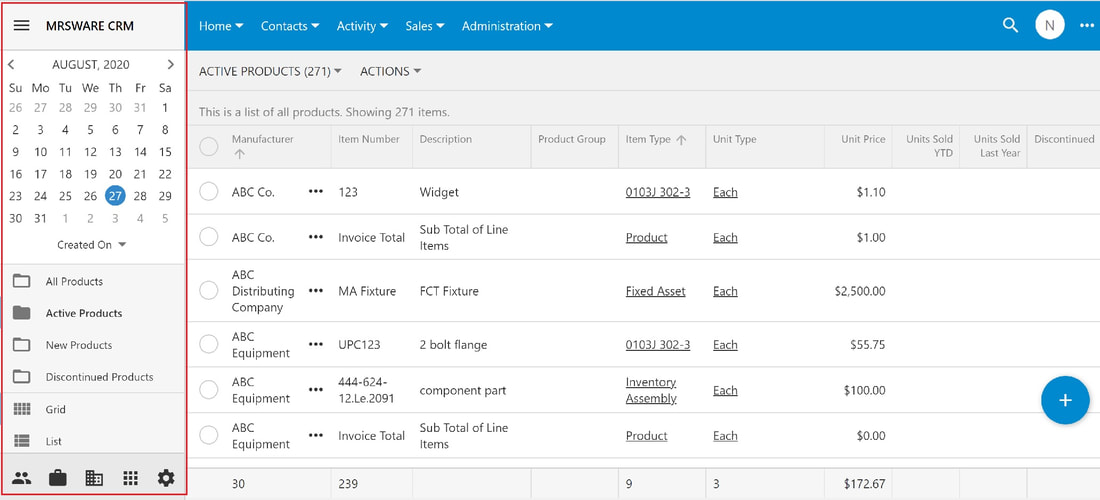
The Product Catalog Sidebar provides a calendar, pre-filtered views, page view options, and more.
Chapter 4 - Product Catalog Sidebar
In Lesson 2.4 Settings, we learned about customizing your MRSweb with the use of Settings. In Lesson 2.7 Sidebar, we learned more about the Sidebar in MRSweb. The Sidebar setting is not available on the Home page, but is available in all other areas of MRSweb.
! In Settings, check "Landscape" to make sure the Sidebar appears in your pages.
The Product Catalog Sidebar provides a calendar, pre-filtered views, page view options, and more.
Desktop view (below) shows the Sidebar on the left side of your screen.
Click or tap "Sales -> Product Catalog" on the Menu bar to access the Sidebar.
Click or tap "Sales -> Product Catalog" on the Menu bar to access the Sidebar.