MRSweb - Lesson 3.3 - Home page - Webmail | MRSweb Online Training
← Back to Web Training Curriculum Hub
Lesson 19 of 69
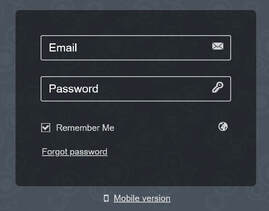
To login to Webmail:
Use your full email address and the password for your Mailbox.
i Note that it is possible to set your Mailbox password to be different from your MRSware Desktop login password, so they might not be the same. If you get a "wrong password" error message, either your Admin in the office or MRSware Support can reset it for you.
Feel free to use the Remember Me checkbox on the login dialog. This will tell your web browser to automatically log you into the site on future visits, without having to enter your Email and Password again.
Use your full email address and the password for your Mailbox.
i Note that it is possible to set your Mailbox password to be different from your MRSware Desktop login password, so they might not be the same. If you get a "wrong password" error message, either your Admin in the office or MRSware Support can reset it for you.
Feel free to use the Remember Me checkbox on the login dialog. This will tell your web browser to automatically log you into the site on future visits, without having to enter your Email and Password again.