
If you want to add a category to all the contacts at a company you can now use our easy, new feature Bulk Update Contact(s) Categories.
Here's how:
Here's how:
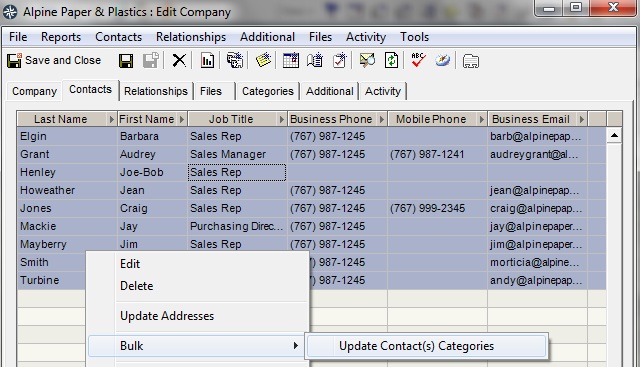
In the example below, I want to add the category "MM::Bob" to all of the contacts at Alpine Paper.
1. open a Company card
2. click on the Contacts tab
3. select all of the contacts listed (click on the 1st contact, hold down the Shift key, click on the last contact) (you can multi-select just one or two contacts, click on one contact, hold down the Ctrl key, click on the other contacts)
4. right click and select "Bulk -> Update Contact(s) Categories"
1. open a Company card
2. click on the Contacts tab
3. select all of the contacts listed (click on the 1st contact, hold down the Shift key, click on the last contact) (you can multi-select just one or two contacts, click on one contact, hold down the Ctrl key, click on the other contacts)
4. right click and select "Bulk -> Update Contact(s) Categories"
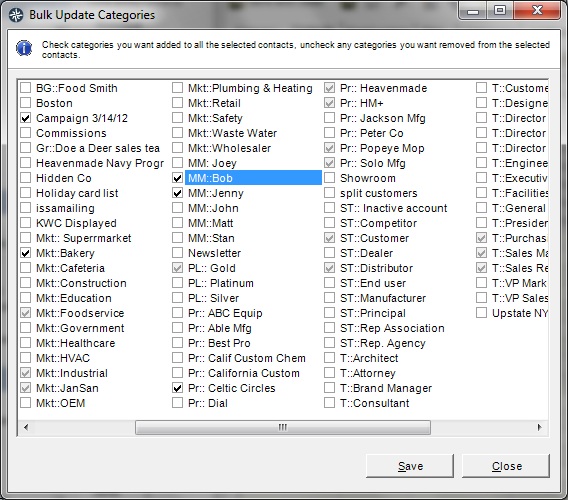
5. when the Edit Categories dialog opens, click on the category you want to add (in this case "MM::Bob")
6. click "Save"
6. click "Save"
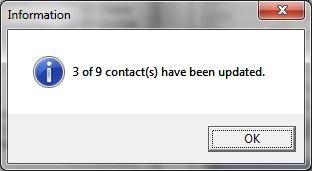
7. click "Ok" in the Information dialog once the categories have been updated
| |