
Getting Started & Desktop Interface Navigation
System Installation & Setup
MRSware Desktop is a native Windows application built on the Microsoft .NET Framework for maximum speed, security, and offline capability. It runs on Windows 10, Windows 11, and Windows Server environments.
Always run the Connection Tester utility in MRSware after installation to verify firewall connectivity to your firm's encrypted MRSware database server.
Desktop Interface Navigation
The MRSware Desktop interface is structured into four primary interactive zones:
- Top Menu Bar & Toolbars: Fast action buttons for New Contact, Quick Add Invoice, Send Email, Edit in Spreadsheet, and Data Analysis.
- Navigation Sidebar: Left panel allowing quick switching between CRM, MREPS Sales/Commissions, SFA, File Share, and System Admin modules.
- Workspace Viewport: Main workspace area supporting instant toggling between Table View, Compact Cards, and Multiline Cards.
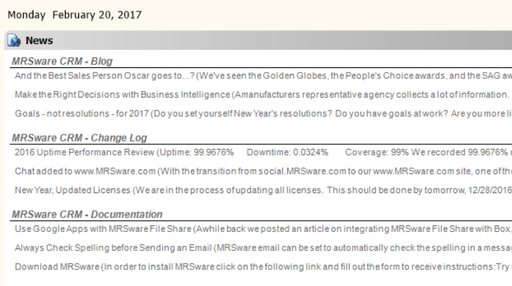
- Dockable Panels & Status Bar: Integrated preview pane, statistics panels, database sync indicator, and RSS news bulletins.
Multi-Window Workspaces
Unlike standard web browsers that overwrite your context, MRSware Desktop supports true multi-window multitasking. You can right-click any company, customer, project, sales rep, or invoice listing and choose "Open in Separate Window". This allows you to inspect multiple transactions side-by-side without losing your place in master listings.
View Modes: Table View, Compact Card View & Multiline Card View
MRSware Desktop provides three standardized presentation view modes across CRM (Companies, Contacts, Tasks, Journals, Projects) and MREPS (Sales Rep Management):
📋 1. Table View (Standard Data Grid)
High-density tabular grid optimized for multi-column comparison, column reordering, sorting, header grouping, and live summary aggregate footers.
🗂️ 2. Compact Card View (2-Line Cards)
Streamlined 2-line visual cards rendered via custom GDI+ drawing. Displays primary title, badges, interactive checkboxes, and key contact/due metadata at a glance.
📑 3. Multiline Card View (Expanded Cards)
Rich, expandable multi-line card layout (CardsView) featuring structured fields, category badges, note snippets, and customizable card field settings.
Use the View menu or the toolbar View Style selector (Table View, Compact Cards, Multi-Line Cards) to switch views instantly. MRSware automatically persists your chosen view mode and panel layout per user and per workspace form. To customize the typography or font size used across Card Views or Table Listings, see User Preferences & Display Font Customization below.
Detailed Capabilities of Each View Mode
| Feature / Operation | Table View | Compact Card View (2-Line) | Multiline Card View |
|---|---|---|---|
| Visual Density | Ultra-high density (20px row height) | Medium compact (2 structured lines) | Expanded multi-line structured block |
| Line 1 Content | Header-aligned data cell | Primary Name/Subject, Type badge, Split %, Status checkbox | Bold Header Title, Record Type, Status badge |
| Line 2 Content | N/A (single row) | Phone, Email, Address, Due Date, Duration, Category tag | Secondary summary line / metadata |
| Additional Lines | N/A | N/A (fixed 2-line height) | Address, Custom Fields, Categories, Notes snippet |
| Interactive Actions | In-grid click, double-click to open, column header sort | Clickable completion checkboxes, Sort toolbar dropdown (Asc/Desc toggle), Filter toolbar button, right-click Filter > By Selection / Excluding Selection | Expand/Collapse individual cards, Clickable links, toolbar sorting & filtering |
| Card Field Customization | Column Chooser (Right-click header) | Standardized 2-line GDI+ template | Card Field Settings... dialog (Show/Hide fields) |
| Expand / Collapse All | Group row expand/collapse | N/A | Expand All Cards / Collapse All Cards menu actions |
| Font & Typography | Configured in Preferences (Font for Table Listings) | Configured in Preferences (Font for Card Views) — dynamic height & line spacing | |
User Preferences, Themes & Workspace Customization
MRSware Desktop is engineered to be tailored to each user's unique role and daily routine. An agency principal monitoring pipelines or an outside rep reviewing customer notes needs a different daily view than an inside administrator processing hundreds of invoice line items or reconciling multi-tier commission statements. Every panel size, toolbar position, display font, and shortcut is remembered locally in your personal preferences (`%APPDATA%\MRSware\<username>\Preferences\`).
To access all personal settings, click Tools → Preferences... on the top menu bar (or press Alt+T, then P). Settings are categorized in the left tree under (General) and individual functional modules.
Themes & Custom Interface Colors
Under (General) → Colors, you can personalize the application color scheme:
- Preset Themes: Choose from pre-configured interface color themes in the Select a theme dropdown.
- Property Grid Customization: Modify individual interface elements—including window backgrounds, active highlight rows, grid borders, and panel headers—using the integrated property grid.
- Save as Theme: Click the Save as Theme link to preserve your customized color palette for future use.
Display Fonts & Typography
MRSware Desktop allows you to tailor typography and font sizes across the application interface to suit your display hardware, screen resolution (e.g. 4K, laptop, or multi-monitor setups), and personal readability preferences.
Individual user preferences are stored locally on each device and remembered across application restarts. This allows you to comfortably configure a larger font size (e.g. 10 pt or 11 pt) on your portable laptop and a standard size (e.g. 9 pt) on your office multi-monitor setup without affecting your settings on other machines.
Configurable Font Settings
The Settings page (under Tools > Preferences > (General) > Settings) provides dedicated font configuration controls for the primary display areas of the desktop client:
📊 Font for Table Listings
Controls the typeface, style, and point size used in all standard data grid tables throughout MRSware (Companies, Contacts, Invoices, Orders, Commissions, Projects, and Sales Reps).
Default: 9 pt. Arial✉️ Font for E-Mail Panel
Controls the font used in the integrated desktop email client, including the folder message listings and preview reader pane.
Default: 9 pt. Arial🏠 Font for Home Panels
Controls the font used across the desktop Home view dashboard panels, including Upcoming Due-Date Journals, Interactive Tasks, and news reader bulletins.
Default: 9 pt. Microsoft Sans Serif🗂️ Font for Card Views
Controls the font used whenever any module is toggled to Compact Cards (2-line cards) or Multiline Cards (expandable cards). When updated, all card views dynamically recalculate their row heights and line spacing to match your chosen font size.
Default: 8.25 pt. Microsoft Sans SerifHow to Change a Font
- On the Settings page, click the Font Dialog button next to the display area you wish to customize (e.g. Font for Card Views : or Font for Table Listings :).
- In the standard Windows Font selection dialog:
- Select your preferred Font family (e.g. Arial, Segoe UI, or Tahoma).
- Select the Font style (e.g. Regular or Bold).
- Select the point Size (e.g. 9, 10, 11, or 12).
- Click OK in the Font dialog. The text box next to the button will immediately display your selection (for example:
10 pt. Segoe UI). - Click OK or Apply at the bottom of the Preferences dialog to save your changes. Open card views, grids, and dashboard panels refresh automatically with the updated typography.
Sort Search Menu Items
Also located on the Settings page is the Sort Search Menu Items checkbox:
- Checked by default (Recommended): When enabled, all entries under the top-level Search menu are alphabetized (e.g., Activities, Companies, Contacts, Customers, Invoices, Opportunities, Orders, Projects, Sales Reps). This provides fast alphabetical lookup when jumping directly to specialized search forms.
- Unchecked: If unchecked, menu items remain in their original default system order.
Managing, Resizing & Collapsing Panels in the Sidebar
The Sidebar on the left side of MRSware hosts quick-navigation and shortcut panels, including Shortcuts, Search, and New.
Resizing the Sidebar & Panels
- Sidebar Width (Splitter Bar): Hover over the vertical splitter dividing the Sidebar from the main workspace until the cursor becomes a horizontal resize arrow (↔). Click and drag left or right to make the entire sidebar wider or narrower.
- Individual Panel Height: Each panel in the sidebar features a blue header bar. Move your cursor over the upper edge of any panel header until it changes into a vertical resize arrow (↕). Click and drag up or down to allocate more or less vertical height to that panel.
Automated Sidebar Reset & Collapse Controls (`View > Side Bar`)
When changing screen resolutions, switching between laptop displays and external monitors, or moving windows between screens, sidebar panels can occasionally expand beyond the visible screen boundary. MRSware includes two built-in recovery tools under View → Side Bar:
📐 Resize Panels
Navigate to View → Side Bar → Resize Panels. MRSware instantly recalculates all active panels in the sidebar and distributes them into equal, uniform heights within your current screen's visible area.
📁 Collapse Panels
Navigate to View → Side Bar → Collapse Panels. This minimizes all sidebar panels down to their single-line headers simultaneously, allowing you to manually expand only the specific panel you need.
Turning Panels On and Off
You can declutter your workspace by turning off panels or hiding the sidebar entirely:
- Toggle the Full Sidebar: Choose View → Side Bar → Show Side Bar. When unchecked, the sidebar disappears, granting maximum horizontal width for multi-column grids, wide Data Analysis cubes, or invoice spreadsheets.
- Toggle Individual Panels: Use the top-level View menu to turn specific sidebar child panels on or off:
- View → Shortcuts: Displays or hides the Shortcuts panel.
- View → Search: Displays or hides the Search panel.
- View → New: Displays or hides the New object creation panel.
Moving & Docking Toolbars
MRSware features an advanced multi-dock toolbar system (`ToolBarManager` and `ToolBarDockHolder`). Alongside the main workspace toolbar, you have three customizable satellite toolbars:
- New Toolbar: Quick-click buttons to create new records (Contacts, Invoices, Journals, Tasks).
- Shortcuts Toolbar: Instant navigation icons for your most-visited modules.
- Search Toolbar: Fast-access search dialog buttons and cross-module search.
How to Move and Dock Toolbars
- Identify the Drag Handle: Each docked toolbar has a stippled gripper handle on its left/top edge along with its title (e.g.
New >,Shortcuts >,Search >). - Click and Drag: Hover over the gripper until your cursor turns into a 4-way move cursor (✥). Click and drag the toolbar.
- Dock to Any Border: Drag the toolbar toward the Top, Bottom, Left, or Right edge of the window. A dock guideline appears to indicate where the toolbar will snap.
- Stack Rows or Align Side-by-Side: You can dock multiple toolbars side-by-side along the top row to save vertical space, or stack them into multiple rows.
- Float as Tool Palettes: Drag a toolbar into the open workspace away from any window borders. The toolbar detaches into an independent Floating Window complete with its own title bar and close button (×), which you can position anywhere—even on a secondary monitor. Double-click the floating title bar or drag it back to an edge to re-dock it.
Customizing Toolbar & Shortcut Icons
As MRSware has expanded to encompass dozens of specialized screens and workflows, you may find that your default toolbars contain buttons you rarely use. You can customize exactly which icons appear in your toolbars and panels so that only your agency's vital daily workflows are visible.
Step-by-Step: Selecting Your Toolbar Icons
- Go to Tools → Preferences... (Alt+T, then P).
- In the left tree under (General), select Shortcuts.
- The interactive tree displays every command, module, and search dialog in MRSware alongside its official icon:
- File / New: Check or uncheck buttons for creating Invoices, Orders, Quotes, Contacts, Companies, Journals, Tasks, or Projects.
- Go To: Check or uncheck module navigation buttons (e.g. Calendar, Data Analysis, Commissions, SFA).
- Search: Check the specific search forms you use most frequently (e.g. Search Companies, Search Contacts, Search Invoices).
- Check the box next to any action you want on your toolbar/sidebar, and uncheck any screens you do not use regularly.
- Click OK or Apply. MRSware instantly rebuilds your Shortcuts, New, and Search toolbars and sidebar panels with your tailored icon set!
MRSware toolbars also support native Windows drag-and-drop. You can drag records, customer files, or emails directly onto shortcut and toolbar buttons to perform instant record associations or trigger workflows.
Turning Toolbars On and Off
If you prefer an uncluttered view, you can hide any toolbar completely:
- Click View → Toolbars on the top menu bar.
- Click any toolbar item (New, Shortcuts, or Search) to toggle its checkmark on or off.
- Floating toolbars can also be closed directly by clicking the × button on the floating header.
Toolbar dock positions and visibility preferences are saved automatically across sessions.
Customizing Tab Stops for Lightning-Fast Data Entry
For high-throughput transactions like Wholesale Order Entry, Invoice Entry, and Payment Entry, you can configure the exact keyboard navigation path across form fields:
- On any Order, Invoice, or Quick Add screen, click Options → Customize Tab Stops (or right-click the form header).
- In the Tab Stop dialog, check only the essential fields your team populates (e.g. Manufacturer, Customer, Invoice #, Invoice Date, Product #, Quantity, Price).
- Uncheck secondary or auto-calculated fields (such as extended commissions, terms, or secondary addresses).
- Save your tab order. Now, pressing Tab jumps directly between your essential fields, allowing staff to enter complete records at maximum speed using keyboard navigation alone without touching the mouse!
Dockable Record Preview Window
The Record Preview Window (or Preview Pane) delivers instantaneous, zero-click inspection of any selected record across Table View, Compact Card View, and Multiline Card View without launching modal dialogs.
Key Capabilities of the Preview Window:
- Zero-Click Inspection: Moving your selection with arrow keys or mouse clicks instantly renders the full record profile in the preview pane.
- Flexible Docking Layouts: Dock the preview pane to the Right (recommended for wide monitors), to the Bottom, set to auto-hide, or undock/float it onto a secondary physical monitor.
- Rich HTML Document Rendering: Powered by an embedded read-only HTML engine displaying structured tables, contact badges, key dates, and financial metrics.
- Line-Break & Formatting Preservation: Multi-line notes, call interaction logs, and project descriptions preserve natural line breaks (
<br/>) and whitespace formatting cleanly. - Top Action Bar:
- Edit Button: Instantly opens the standard Add/Edit dialog for the highlighted record.
- Print Button: Triggers direct WYSIWYG printing using the native Windows Print dialog (
DocumentPrint()) for immediate hard-copy generation.
- High-Performance 250ms Debouncing: Equipped with an intelligent 250ms selection timer to ensure rapid scrolling through thousands of records without UI stutter or unnecessary database round-trips.
- Selection-Based Blanking: Cleans the preview canvas automatically when no record is selected or during active search filtering.
Edit in Spreadsheet Functionality
For high-volume data entry and rapid multi-row maintenance, MRSware Desktop incorporates the reusable SpreadsheetGridControl engine. This feature brings full Microsoft Excel spreadsheet ergonomics directly into core business screens—including Invoice Entry, Product Catalog, and Sales Rep Management.
Click the "Edit in Spreadsheet" button on the workspace toolbar, or choose Edit > Edit in Spreadsheet... from the menu bar (Ctrl+E). The spreadsheet editor loads the currently filtered recordset ready for direct tabular modification.
Spreadsheet Features & Power-User Tools:
- In-Cell Editing & Keyboard Navigation: Click any cell or press Enter to begin typing. Press Tab to advance to the next cell or Enter to move down to the next row.
- Add-New Row Line: An empty insertion row is anchored at the bottom of the grid (
NewRowPosition.BottomRow), allowing continuous rapid data entry without opening new dialogs. - Excel Clipboard Copy & Paste (Ctrl+C / Ctrl+V): Copy multi-column tabular data straight from external Microsoft Excel spreadsheets or CSV files and press Ctrl+V (or click "Paste from Excel") to populate hundreds of rows instantaneously.
- Freeze Columns: Right-click any column header and select Freeze Column to lock key reference columns (e.g. Invoice #, Part #, Rep Name) on the left while scrolling horizontally through wide datasets.
- Header Sorting & Context Menu: Sort columns ascending or descending by clicking headers, auto-fit column widths, or customize column alignment.
- Cell Fill-Down: Duplicate values down consecutive rows quickly for repetitive field entry.
- Search & Filter (Ctrl+F): Built-in search toolbar to highlight and filter rows by any keyword or column value in real-time.
- Export to CSV / Excel: Export your customized spreadsheet view to standard CSV or Excel files with a single click.
- Atomic Batch Validation & Transactional Save: Includes Save Changes and Save & Close options with live progress indicators. All rows undergo data validation (e.g. valid dates, required lookups, split percentage bounds) and commit to the database in a single atomic transaction.
Interactive Statistics Panels & Home Dashboard
MRSware Desktop features dynamic statistics panels engineered to give agency principals and reps immediate operational intelligence without running formal reports:
🏠 Home Dashboard Panels
Interactive live panels embedded directly on the main desktop Home view:
- Upcoming Due-Date Journals Panel: Real-time feed of scheduled touch points and customer commitments.
- Interactive Tasks Panel: Prioritized task list with one-click completion checkboxes and overdue indicators.
- Sales & Commission KPI Widgets: YTD Sales, Sales Growth %, YTD Commissions, Commission Growth %, Orders, Invoices, and Monthly Averages.
- Customer Attrition KPI Card (
Cust. Attrition): Live rolling 12-month customer retention and churn metric on the Home dashboard right-hand KPI sidebar.- Dynamic Color Coding: Emerald Green (≤ 5.0% churn) for strong account retention, Amber/Orange (5.1% – 15.0%) for moderate customer loss, and Alert Red (> 15.0%) when account churn spikes.
- Integrated Subtitle: Displays total accounts lost, lost revenue volume, and baseline customer pool (e.g.
12 lost ($45K) · 285 prior). - 1-Click Deep Drill-Down: Double-clicking the KPI tile automatically opens the Customer Retention & Attrition Analysis OLAP cube (or falls back to the Customer Listing table) for instant root-cause analysis.
- Security & Territory Scoping: Enforces role permissions (
MRSware/Manufacturers Rep/Invoices) and automatically restricts rep views to assigned accounts viafnFilterCustomers(@UserId).
👥 Sales Rep Management Statistics Dock
Collapsible statistics panel (clpStatistics) docked at the bottom of the Sales Rep workspace:
- # Unassigned Customers: Identifies customer accounts missing sales rep assignments.
- # Unassigned Companies: Tracks master CRM companies lacking assigned reps.
- Total Agency Growth %: Real-time calculation comparing YTD vs. LYTD sales across active reps.
- See All Territories Users: Live list of users with unrestricted agency-wide visibility.
Grid Controls, Sorting & Grouping
All listings in MRSware Desktop feature comprehensive sorting, grouping, and customization tools:
- Table Column Header Sorting: In Table View, click any column header to sort ascending or descending. An arrow indicator shows the current sort order.
- Sort Toolbar Button (Card Views): In Compact Cards and Multiline Cards where table headers are absent, use the Sort dropdown button on the top toolbar. Click any available field to sort, and click the currently selected field to toggle between Ascending (Asc) and Descending (Desc) order (indicated with a checkmark).
- Column Chooser: Right-click grid headers to add, remove, or reorder custom data fields.
- Multi-Column Grouping: Drag header column buttons to the top grouping panel to nest records hierarchically (e.g. Group by Principal > Group by Sales Rep).
- Summary Aggregates: Display real-time totals, averages, and counts at the bottom of numeric columns (Sales, Commission, Cost, Lifetime Value, Churn) formatted cleanly as whole numbers.
Search & Advanced Filtering
MRSware provides versatile tools to locate and isolate records quickly across tables and card views:
- Filter Toolbar Button: Dropdown button on the workspace toolbar enabling fast filtering by status, category, or follow-up flag color (Red, Yellow, Green, Blue, Purple, Orange, Complete, Not Flagged, or All).
- Context Menu Filtering (By Selection & Excluding Selection): Right-click any card or row and select:
- Filter > By Selection: Shows only records matching the selected entity (e.g. all emails from that sender or tasks for that contact).
- Filter > Excluding Selection: Inverts the filter to hide records matching that entity, removing noise from recurring alerts or automated notifications.
- Filter > Remove Filter: Restores the full recordset.
- Inline Grid Search: Type directly in column header search cells for instant autocomplete in Table View.
- Multi-Condition Filter Builder: Combine
AND/ORconditions across multiple criteria (e.g. Sales Rep = 'Smith' AND YTD Sales > $50,000). - Date Range Filtering: Presets for This Month, Last Quarter, Year-to-Date, or custom calendar ranges.
- Saved Filter Presets: Save frequently used search filters to your personal toolbar shortcuts.

📚 Related Documentation & Deep-Dive Articles (42)
View in Documentation Library →Explore additional procedural tutorials and technical documentation references for this chapter:
4 Ways to Filter your Lists, by Example
Technical guide for 4 Ways to Filter your Lists, by Example.
Account Numbers, to use them and which to use
Technical guide for Account Numbers, to use them and which to use.
Add a MRSweb Shortcut/App Icon to Home Screen
Technical guide for Add a MRSweb Shortcut/App Icon to Home Screen.
Advanced Search
Technical guide for Advanced Search.
Badge Name
Technical guide for Badge Name.
Be Prepared, Be Professional, Be Productive
Technical guide for Be Prepared, Be Professional, Be Productive.
Bulk Update Types
Technical guide for Bulk Update Types.
Closing MRSware in Error
Technical guide for Closing MRSware in Error.
Column Control in Tables
Technical guide for Column Control in Tables.
Conflict Resolution User Manual
Technical guide for Conflict Resolution User Manual.
Connection Tester
Technical guide for Connection Tester.
Download MRSware
Technical guide for Download MRSware.
Education User Manual
Technical guide for Education User Manual.
Filter Date columns in MRSware Listings
Technical guide for Filter Date columns in MRSware Listings.
Fixing Incorrectly Assigned Account Numbers
Technical guide for Fixing Incorrectly Assigned Account Numbers.
Getting Started in MRSware
Technical guide for Getting Started in MRSware.
Hide & Mark Hidden
Technical guide for Hide & Mark Hidden.
History - data history - to retain or not to retain?
Technical guide for History - data history - to retain or not to retain?.
Inline Editing - When and How to Use
In-line editing
Installing MRSware using Windows 7, 8, 10
Technical guide for Installing MRSware using Windows 7, 8, 10.
Member vs. Non-Member Tuition
Technical guide for Member vs. Non-Member Tuition.
MRSweb Charts! Sales and Activity Visualizations
Technical guide for MRSweb Charts! Sales and Activity Visualizations.
MRSweb's Batch Edit
Technical guide for MRSweb's Batch Edit.
Navigating MRSweb: How To Get Around
Technical guide for Navigating MRSweb: How To Get Around.
Open a Word 2007 document in an earlier version of Word
Technical guide for Open a Word 2007 document in an earlier version of Word.
Open in Separate Window - multiple workspaces to not lose your place
Technical guide for Open in Separate Window - multiple workspaces to not lose your place.
Open Microsoft Office files when you don't have the correct version, or don't have Office installed at all
Technical guide for Open Microsoft Office files when you don't have the correct version, or don't have Office installed at all.
Relationship Management
Technical guide for Relationship Management.
Reply Automatically with a Template
Technical guide for Reply Automatically with a Template.
Resize Panels & Collapse Panels in Sidebar
Technical guide for Resize Panels & Collapse Panels in Sidebar.
Safeguards for accidentally deleting content in MRSware
Technical guide for Safeguards for accidentally deleting content in MRSware.
Search Icons for the Shortcuts Panel
Technical guide for Search Icons for the Shortcuts Panel.
Searching in Tables / Listings
Technical guide for Searching in Tables / Listings.
Shortcuts / Screen List Overview
Technical guide for Shortcuts / Screen List Overview.
Student Number
Technical guide for Student Number.
Testing your Out of Office response
Technical guide for Testing your Out of Office response.
Track New Business Guidelines
Technical guide for Track New Business Guidelines.
Tracking Your Accounts through Phases using Types: Give Your Team a Hint
Technical guide for Tracking Your Accounts through Phases using Types: Give Your Team a Hint.
Using Signatures to Quickly Reply to Common Questions
Technical guide for Using Signatures to Quickly Reply to Common Questions.
Using the News panel for RSS feeds on the MRSware Home page
RSS Reader built into MRSware
Where to Find Online Training and Support
Technical guide for Where to Find Online Training and Support.
Zoom for Larger Font Sizes in MRSweb
Technical guide for Zoom for Larger Font Sizes in MRSweb.