
Projects, Job Tracking & Quote Management
Project Architecture & Stakeholders
In multi-line sales rep agencies, deals often involve complex web structures of independent parties—architects, engineers, general contractors, distributors, end-user owners, and manufacturer principals. MRSware Projects unite all participating companies, contacts, quotes, and activities under a single project umbrella.
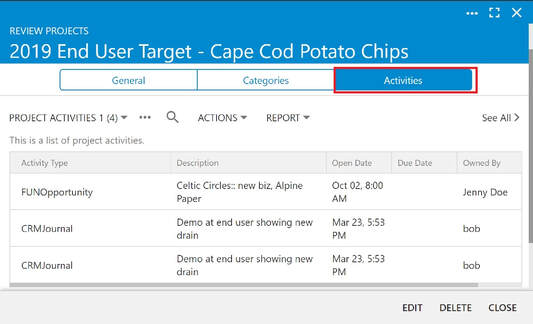
Activity & Document Aggregation
When viewing a Project record, MRSware Desktop automatically rolls up all associated journal notes, calendar meetings, file attachments, and email correspondence across all participating entities into a single unified chronological timeline.

Project Financial Summaries & Quotes
Track job spec quotes, estimated contract values, and actual invoiced revenue per project. Print comprehensive Project Financial Summaries detailing closed opportunities, project expenses, and net agency revenue.
📚 Related Documentation & Deep-Dive Articles (3)
View in Documentation Library →Explore additional procedural tutorials and technical documentation references for this chapter:
Closed Opportunities, Expenses and Revenue from Project Printout
Technical guide for Closed Opportunities, Expenses and Revenue from Project Printout.
Ranking Customers and Prospects in MRSware
Technical guide for Ranking Customers and Prospects in MRSware.
Track Project Updates
Technical guide for Track Project Updates.