
Users can update the System Type on multiple Contacts (or Companies) all at the same time:
1) Go to the Contact Listing (or Companies), or use the Search → Contacts menu option to pull up a list you are interested in. Filter and sort that list as desired to find the group you want to update.
2) Multi-select the Contacts, then right-click on any selected contact and choose Bulk → Update Types.
1) Go to the Contact Listing (or Companies), or use the Search → Contacts menu option to pull up a list you are interested in. Filter and sort that list as desired to find the group you want to update.
2) Multi-select the Contacts, then right-click on any selected contact and choose Bulk → Update Types.
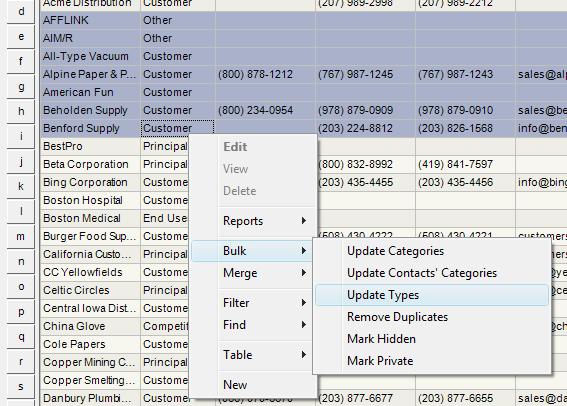
| 3) You will be presented with the dialog to select one of your System Types. Select the Type you want and it will be assigned to all selected Contacts. | 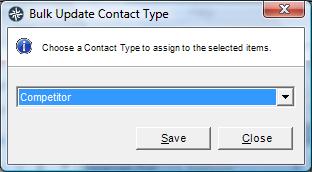 |
Permissions
This function is controlled by permissions in the system. If you do not have this option in your context menu, please ask your System Administrator to enable it for you.
See Also
Manage Contact Types
This function is controlled by permissions in the system. If you do not have this option in your context menu, please ask your System Administrator to enable it for you.
See Also
Manage Contact Types