
A brief on what each of those Shortcuts leads to and what each of those screens are used for...
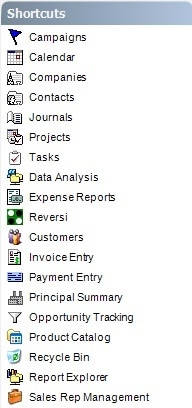 | Campaigns - sales and marketing events, mailings, actvities that are taking place. Accounts for budget, expenses, and revenues from those activities. Calendar - appointments and tasks in traditional monthly, weekly, and daily view formats. Companies - organizations with whom we conduct business. Contacts - people who work at the Companies. Journals - activity reporting, call logging, and general note taking space. Has an emphasis on tracking time and associating activities with Companies, Contacts, and Projects. Projects - link all types of activities together to track an event, a work job, a custom part, weekly field reports, or anything else that has related parts or contacts. Tasks - assign and complete work items. |
Data Analysis - also known as OLAP or pivot table, interactively rearrange and drill-into your data to drawn forth information and understanding of what is happening across business segments.
Expense Reports - track money spent and group expenses into a report for submittal, approval, and payment.
Reversi - distract yourself during a hard days work for a few minutes with this classic game (lunchtime only please).
Customers - distributors, wholesales, retailers, these are the companies purchasing from your business. Includes their account numbers and assigned sales rep.
Invoice Entry - enter, edit, and track invoices shipping to customers, sales and commissions. Complements the Invoice Import functionality.
Payment Entry - recognize revenues and pay sales rep commissions.
Principal Summary - summary dashboard of sales, commissions, and commissions payments to date.
Opportunity Tracking - sales funnel and bid tracking tool to forecast sales and business deals.
Product Catalog - item level sku's used in invoicing and opportunity tracking.
Recycle Bin - recently deleted items.
Report Explorer - home of various reports for all of the modules and features of MRSware.
Sales Rep Management - organize sales reps and sales territories to assign sales, customers, and opportunities to.