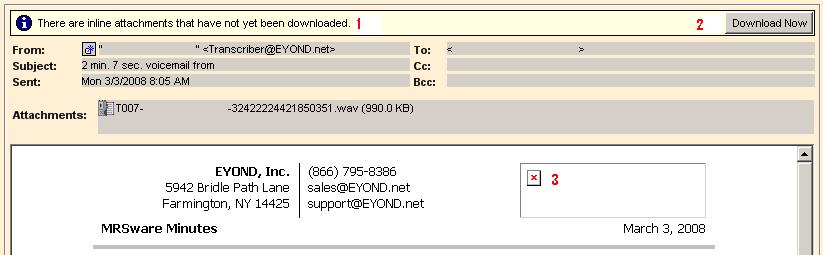
MRSware Users may have noticed that some of their messages are coming in with a new message at the top, "There are inline attachments that have not yet been downloaded."(1). There is also a corresponding "Download Now" button(2) that can be pressed as well.
The inline attachments will be downloaded once the button is pressed. Before they are downloaded, you will note a red x in a blank box(3) on screen -- this is the placeholder for the content that is going to be downloaded. Press the Download Now button to show the content.
The inline attachments will be downloaded once the button is pressed. Before they are downloaded, you will note a red x in a blank box(3) on screen -- this is the placeholder for the content that is going to be downloaded. Press the Download Now button to show the content.
An inline attachment is a file, usually an image, that is inserted directly into the body of an e-mail attachment, rather than attached to the e-mail like a normal attachment is. If an inline attachment is particularly large, or if you are using a slower Internet connection, opening an e-mail with an inline attachment can result in a large delay while the message content is downloaded. In order to make the e-mail load faster, and the system overall more responsive, the Download Now button was added so that this content is downloaded only when desired. After the button is pressed, the button disappears and the content displays in its entirety.
Besides the improved load time associated with only downloading content on demand, this method of handling the previewing of a message has the benefit of not showing potential spam content immediately when a message is clicked. This gives the User the option to delete a message before showing what could be offensive or otherwise inappropriate spam content.
Override for Contacts
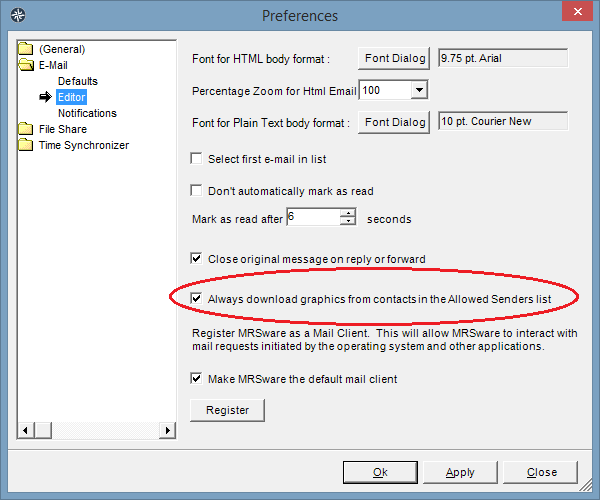
In Preferences, Users have the option to override the Download Now button, always downloading images automatically for Contacts that are in the system. This is a nice option to set for people that you know already since it will always just download their signatures and other images they might insert into emails for you.
Besides the improved load time associated with only downloading content on demand, this method of handling the previewing of a message has the benefit of not showing potential spam content immediately when a message is clicked. This gives the User the option to delete a message before showing what could be offensive or otherwise inappropriate spam content.
Override for Contacts
In Preferences, Users have the option to override the Download Now button, always downloading images automatically for Contacts that are in the system. This is a nice option to set for people that you know already since it will always just download their signatures and other images they might insert into emails for you.