
Do you send out the same message time and time again (maybe a thank you note for a large order)? If so, you can now set up an e-mail template and use this to send your message instead of having to re-type the same message over and over again.
Here's how:
1. Open a new mail window
2. Type your message
3. Go to "File -> Save as Template"
1. Open a new mail window
2. Type your message
3. Go to "File -> Save as Template"
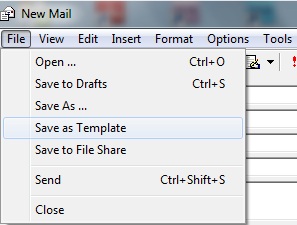
You can go to Mail Templates in your E-mail panel to view or edit your template.
When you are ready to send out the same message again:
1. Open a new mail window
2. Go to "Insert -> Template Mail"
3. Make any necessary additions, alterations
4. Click on "Send"
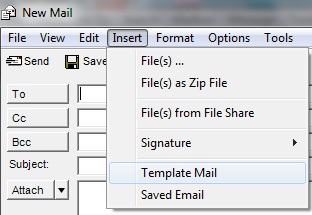
Let me know some of the other reasons you use the E-mail Template.
Don't forget you can also save a new mail as a draft in order to complete a message you started but didn't have time to finish or to make changes at a later time.
Click on the following link to find some sample email templates, that everyone should feel free to download, edit, and add to your own system if they are helpful:
Sample Email Templates