
MRSware can calculate the commissions on items and invoice totals automatically, based on a set of User-defined rules, when invoice are imported using the Invoice Import Wizard. This a very handy feature for adding commissions to an import when the manufacturer does not include them in the invoice report being imported.
The commission rules can be very complex, or very simple. The simplier they are, the easier they are to set up. The easiest, of course, is for those manufacturers that pay a straight commission percent on all invoice items.
The commission rules are set in the apptly named Commission Rules screen, which can be found in the Go To menu under Manufacturers Reps.
The commission rules are set in the apptly named Commission Rules screen, which can be found in the Go To menu under Manufacturers Reps.
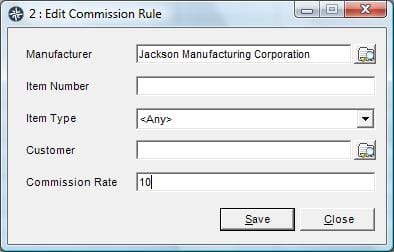
The simplest form of a commission rule is shown in this image. This rule will apply a 10% commission to all invoice or line items imported for Jackson Manufacturing. If you need to be more specific of a particular customer (someone gets a different rate, like a large national distributor) or a particular product (we are paid more on the machine line then the renewables, for example), enter a rule for each different case.
Make sure to always review results of an invoice import to make sure the totals sales and commission match what you were expecting.